A HTC Vive game/experience made and entered in the Ludum Dare 37 Jam with the theme “One Room”. Created in Unity over 72 hours with 2 other people.
- Download They Are In A Room - Built for the original HTC Vive
- Ludum Dare Entry Post (Archive.org link)
Brief
I made this game in Unity with two friends for Ludum Dare 37. The theme for the jam was “One Room”.
None of us had very much Unity experience going into the jam -I had some experience with working in 2D in Unity- and no experience creating VR games so the whole jam was a great learning experience.
The basic idea we had was to make a game where you are in a room full of different things that you can interact with but basically anything that you do is narrated. We were partly inspired by the website “clickclickclickclick” which narrates everything you do on a simple webpage with a button to demonstrate how much information can be gathered from your web browser.
Development
Basic interactions
We started out learning how to to connect the Vive to Unity, getting the position information of the head and controllers, then we moved onto allowing the user to pick up objects and throw them. In order for the user to be able to throw objects, we had to give the objects a force in the correct direction once the player let go of them. This was because whilst being picked up by the player, the objects stopped being physics objects. Most of the first day was spent on this sort of thing, basic interactions.
Sound system
Once we had a reasonable system for allowing the player to interact with the objects in the room, we worked on getting sounds to trigger. A single manager that was attached to the headset prefab was created that would actually play the sounds. The main issue would be playing the correct sounds at the correct time. So, playing the “dropped the cube on the ground” sound when the cube is dropped and hits the ground.
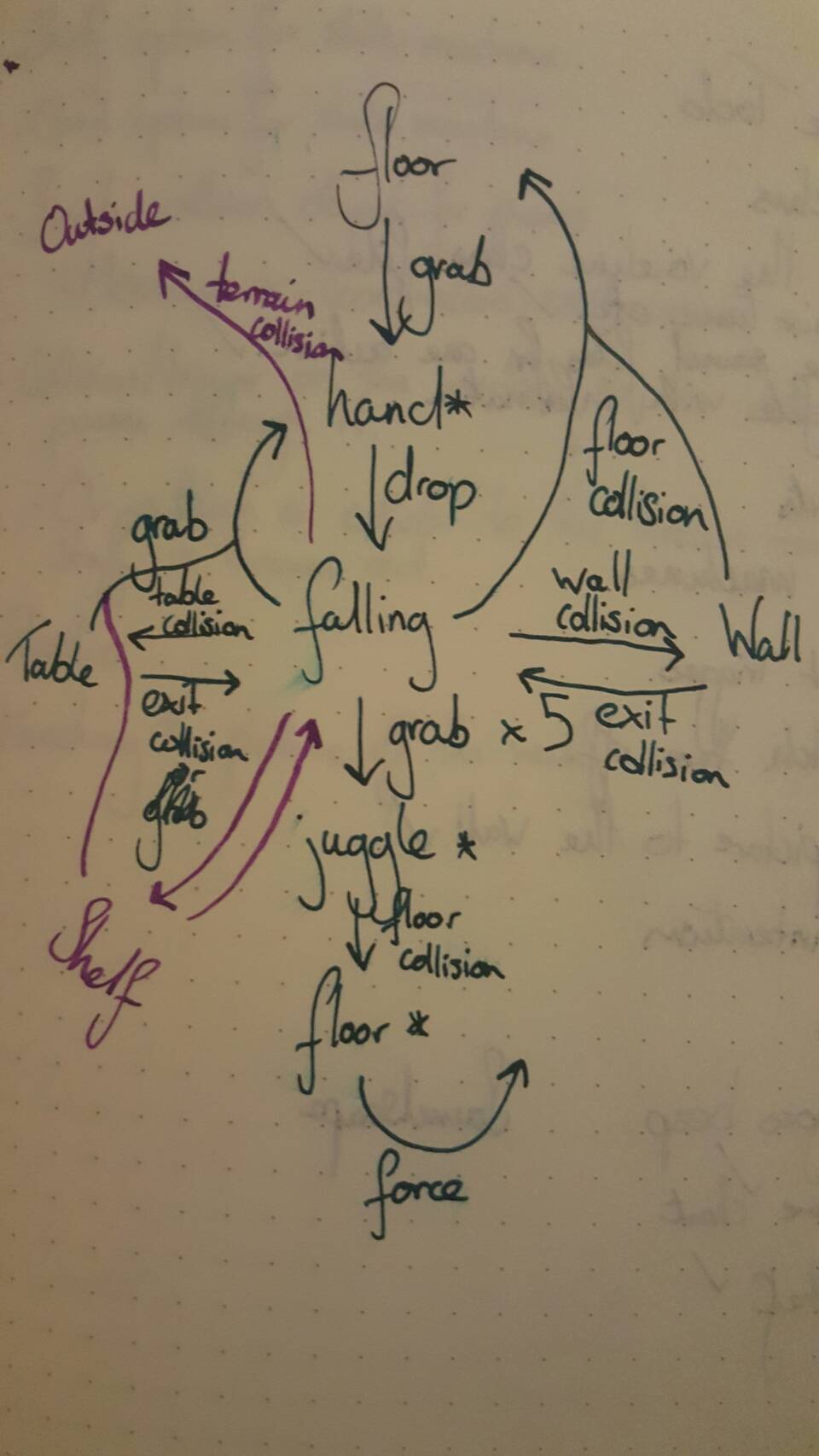
For this, we created a generic state machine system which we then derived from for specific state machines. So there was a state machine for objects that could be picked up — grabbables. These had states for falling, grabbed, on the floor, on the table etc. Various actions would send signals to the state machine manager that would update all the state machines with the action, then state machines would signal that a sound for a particular event should play.
We had several voice lines recorded for each event, so picking up a cube may have “They pick up the cube” and “They grab the cube”. Each voice line had a period given which was the length of time that the voice line cannot play again after being played. Voice lines and actions also had different priorities assigned to them so that voice lines for actions that occur less regularly would be able play straight away when signalled instead of voice lines that are more common.
Most of the rest of the time was spent improving the virtual play-space, adding new objects to play with, a light-switch to turn off the light, a picture to throw around, a poorly tuned piano etc.
State Diagram